

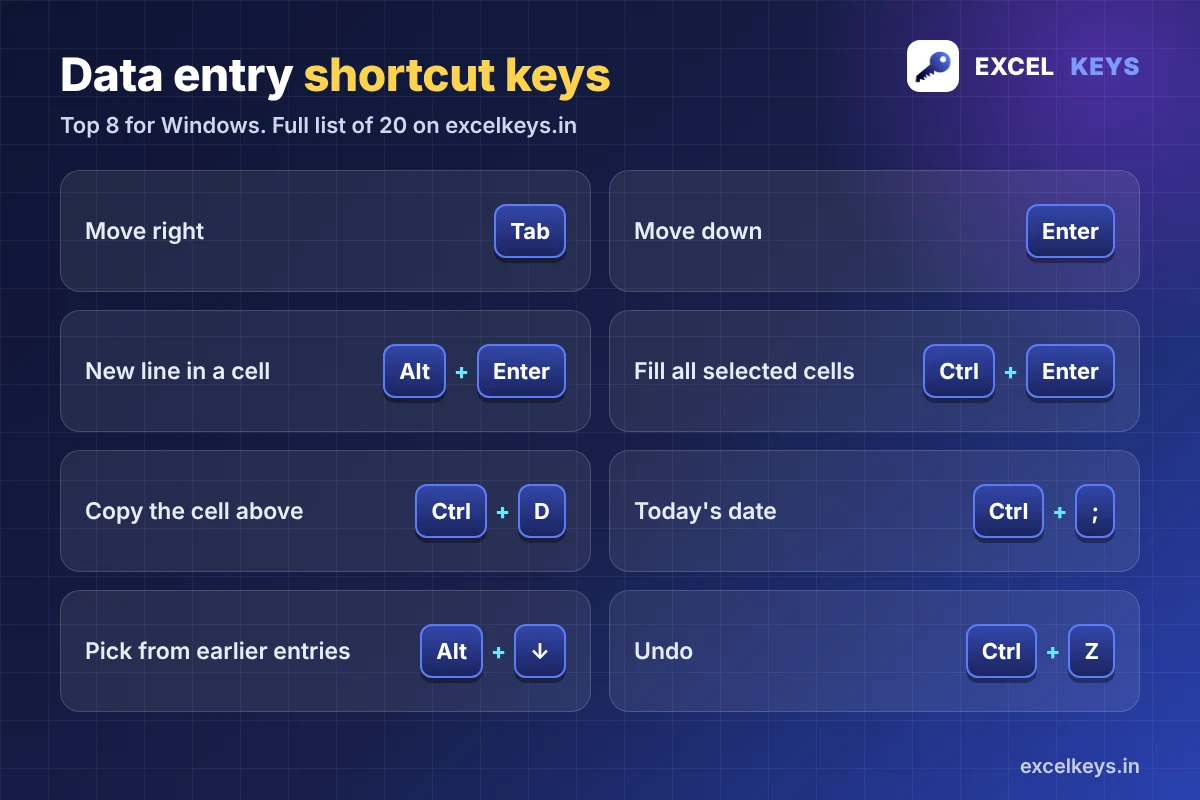
The best Excel shortcut keys for data entry are Tab and Enter to move between cells, Alt+Enter for a new line inside a cell, Ctrl+Enter to fill many cells at once, Ctrl+; for today’s date and Ctrl+D to copy the cell above. Practise these six and most data entry work needs very little mouse.
Last updated: 14 November 2026. Checked against Microsoft Support’s list of Excel keyboard shortcuts. Compiled by Jitendra Rao, founder of Excel Keys, with 11+ years in MIS reporting and dashboard automation.
In this guide
- 20 data entry shortcut keys for Windows and Mac, grouped by task
- A 10-record typing drill, step by step
- How to fill many cells at once and enter dates that do not change
- Four keys that help you catch mistakes before you submit
- A free practice workbook that checks your typing
Why data entry shortcuts matter
Every time your hand leaves the keyboard for the mouse, you lose a second and you may click the wrong cell. Keyboard keys keep your hands in one place, and they make each entry follow the same path. That helps with speed, and it also helps with accuracy, which is what an employer or an exam checks first.
20 Excel shortcut keys for data entry
Mac keys are shown where Excel for Mac has a matching key. “n/a” means we have not listed a Mac key for that action. Shortcuts follow the US keyboard layout.
Move and confirm entries
| Windows | Mac | What it does |
|---|---|---|
Enter | Return | Finish the entry and move down |
Shift+Enter | Shift+Return | Finish the entry and move up |
Tab | Tab | Finish the entry and move right |
Shift+Tab | Shift+Tab | Finish the entry and move left |
Esc | Esc | Cancel the entry you are typing |
F2 | Control+U or F2 | Edit the cell without retyping it |
Fill and repeat
| Windows | Mac | What it does |
|---|---|---|
Ctrl+D | Control+D or Cmd+D | Copy the top cell of the selection down |
Ctrl+R | Cmd+R | Copy the leftmost cell of the selection to the right |
Ctrl+Enter | Control+Return or Cmd+Return | Put the same entry in all selected cells |
Ctrl+' | Control+' | Copy the formula from the cell above |
Ctrl+Shift+" | Control+Shift+" | Copy the value from the cell above |
Alt+↓ | Option+↓ | Pick from values already typed in the column |
Ctrl+E | Control+E | Flash Fill: fill a column by following a pattern you typed |
Dates, times and line breaks
| Windows | Mac | What it does |
|---|---|---|
Ctrl+; | Control+; | Enter today’s date as a fixed value |
Ctrl+Shift+; | Cmd+; | Enter the current time as a fixed value |
Alt+Enter | Option+Return or Control+Option+Return | Start a new line inside the same cell |
Move around and fix
| Windows | Mac | What it does |
|---|---|---|
Ctrl+Arrow key | Cmd+Arrow key | Jump to the edge of the data block |
Ctrl+Z | Cmd+Z | Undo the last action |
Ctrl+Shift+Plus | n/a | Open the Insert box to add cells, a row or a column |
Ctrl+Minus | n/a | Open the Delete box to remove cells, a row or a column |
On a US keyboard, Ctrl+Shift+; is the same key combination as Ctrl+:, which some guides print. To enter a date and a time together, press Ctrl+;, then Space, then Ctrl+Shift+;.
Drill 1: type 10 records without the mouse
The practice workbook has a Drill sheet with 10 dummy employee records: ID, name and department. Type them into the yellow columns. A check column marks each entry OK or Fix. Here is the routine for the first records.
| Emp ID | Name | Department |
|---|---|---|
| EK-101 | Asha Verma | Sales |
| EK-102 | Rohit Nair | HR |
| EK-103 | Meena Iyer | Finance |
- Click the first yellow cell, D5.
- Type
EK-101and pressTab. TypeAsha Vermaand pressTab. TypeSalesand pressEnter. - Excel moves to D6, the first column of the next row. This is because you started the row in D5 and used Tab across.
- Repeat for all 10 rows. If you notice a typo in the cell above, press
Shift+Enterto go back up, orF2to correct only the wrong letters. - Look at the Accuracy cell under the table. It should reach 100%.
By the fourth record, the Department column already has “Sales” in it. Instead of typing it again, press Alt+↓ in that cell and pick Sales from the list, or type the first letter and let Excel’s AutoComplete suggest it. This also protects you from spelling the same department two different ways, which breaks totals and pivot tables later.
Drill 2: fill five cells at once
In the Extra drills table, select the five Status cells, type Pending and press Ctrl+Enter. All five cells fill in one action. With 500 rows this saves hundreds of key presses. Select the cells first, because typing before you select and pressing Ctrl+Enter only affects the one cell.
Drill 3: dates that do not change
Click an empty cell and press Ctrl+;. Excel enters today’s date. Open the file tomorrow and the date is the same, because it is a fixed value. The TODAY() function works the other way: it changes every day. Microsoft explains the difference on its page about inserting the current date and time in a cell. Use Ctrl+; for a record of when something was entered, and TODAY() only when you need the date to move.
Four keys that help you catch mistakes
| Key | What it does | Why it helps |
|---|---|---|
Alt, A, V, V | Open Data Validation | Allow only dates, numbers in a range, or a list |
Ctrl+Shift+L | Turn filters on or off | Spot blanks and odd values by filtering the column |
Alt, A, M | Remove duplicates | Find an ID that was typed twice |
Ctrl+H | Find and Replace | Fix the same spelling mistake everywhere |
Save a copy before you use Remove duplicates or Replace All. Both change many cells at once, and Ctrl+Z may not undo every step if you have done other work in between.
A 5-day practice plan (10 minutes a day)
| Day | Keys to practise | Where |
|---|---|---|
| 1 | Tab, Enter, Shift+Tab | Drill sheet: type the 10 records |
| 2 | F2, Esc, Alt+↓ | Drill sheet: correct errors, pick from the list |
| 3 | Alt+Enter, Ctrl+Enter | Extra drills: address and status columns |
| 4 | Ctrl+;, Ctrl+Shift+;, Ctrl+D | Extra drills: date, time and copy down |
| 5 | All keys, timed | Speed log sheet: note your time and correct entries |
Download the free practice workbook (XLSX). It has an Instructions sheet, a Drill sheet that checks your typing and a Speed log. All names and IDs are dummy data.
The Speed log has three attempts. Your own times will show how much faster you get, so we do not promise a number. Aim for 100% accuracy first, then lower your time.
For data entry jobs and computer exams
A data entry test usually checks speed and accuracy together. A fast but wrong entry costs more than a slow, correct one, because someone must find and fix it later. Revise the 20 keys above, learn where the Tab, Enter and Alt keys sit without looking, and read the question twice before you type. For exam-focused revision, see our Excel shortcut keys A to Z list, which has a section for computer exams.
Your entries often feed formulas and pivot tables later. Learn those next with our guides on Excel formula shortcut keys and pivot table shortcut keys, or start a real file from the free Excel templates.
How this list was checked
- Keys were compared with Microsoft Support’s Excel keyboard shortcuts and Microsoft’s page on inserting the current date and time on 14 November 2026. Alt, A, V, V, Alt, A, M and Ctrl+Shift+L are standard ribbon and filter shortcuts that Microsoft’s page does not list in the same way.
- The practice workbook was recalculated with no formula errors. The check columns compare your typing with the source using an exact match, so capital letters and spaces count.
- Excel versions differ. If a key behaves differently on yours, email info@excelkeys.in with your Excel version.
Frequently asked questions
Which Excel shortcut keys are best for data entry?
The most useful are Tab and Enter to move between cells, Alt+Enter for a new line inside a cell, Ctrl+Enter to fill many cells at once, Ctrl+D to copy the cell above, Ctrl+; for today’s date and Alt+Down Arrow to pick a value you typed earlier.
How do I type two lines in one Excel cell?
Type the first line, press Alt+Enter, then type the second line. On a Mac, press Option+Return. If the lines do not show, switch on Wrap Text for the cell.
How do I fill the same value in many cells at once?
Select all the cells, type the value and press Ctrl+Enter instead of Enter. Every selected cell gets the same entry. If you type a formula, each cell gets the formula adjusted for its own position.
How do I enter today’s date so that it does not change?
Press Ctrl+; in the cell. Excel enters a fixed date that stays the same when you open the file tomorrow. The TODAY function does the opposite: it updates every day. For a record of when an entry was made, use Ctrl+;.
Why does Excel jump back to the first column when I press Enter?
When you move across a row with Tab and then press Enter at the end, Excel returns to the column where you started that row. This only works when you begin the row in one cell and use Tab, not the arrow keys.
Which shortcut keys should I learn for a data entry operator job or test?
Start with the 20 keys in this guide, in this order: Tab, Enter, Ctrl+D, Ctrl+Enter, Alt+Enter, Ctrl+;, Alt+Down Arrow, Ctrl+Z and Ctrl+Arrow. Accuracy matters more than speed, so check your entries before you submit.
Keep going
Open the full Excel shortcut keys list for 200+ keys, Windows and Mac side by side, with a printable PDF.
If your team needs data entry turned into a clean report or dashboard, see the dashboards we have built.