Small Business Sales & Accounts
Ledgerline CRM: Sales and Collections Workspace
A lightweight CRM that puts the sales pipeline and receivables in one calm workspace: deal board, receivables ageing, role-based access and a full activity log.
The reporting problem
In many small businesses, deals sit in one sheet and invoices in another. Nobody knows what needs action today, everyone can edit everything, and payments are chased from memory.
What we built
A lightweight CRM that brings the sales pipeline and receivables into one workspace. Import your Excel or CSV records, move deals across the board, record payments and follow the to-do list, with access controlled by role.
Highlights
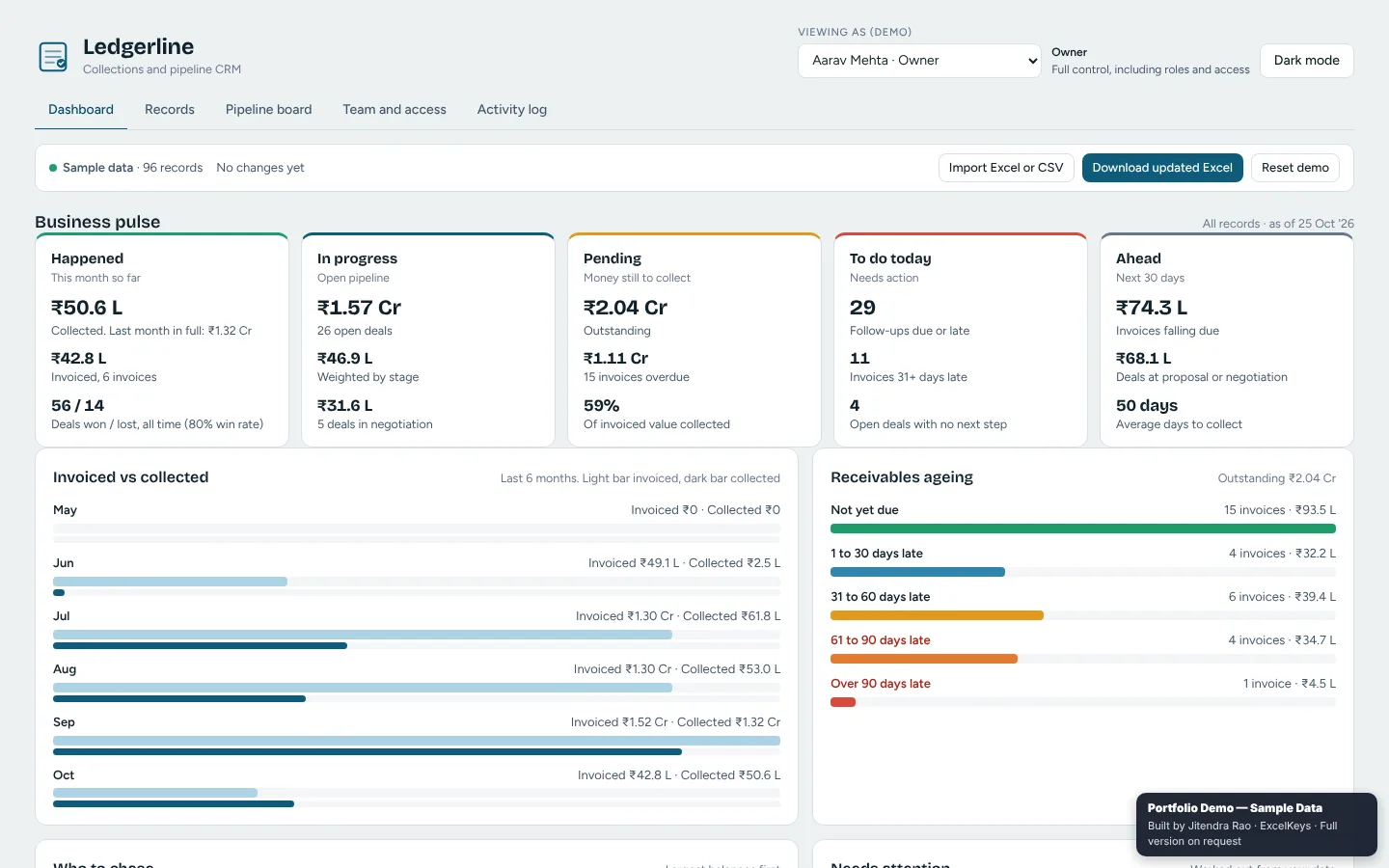
- A business pulse in five panels: what happened, what is in progress, what is pending, what to do today and what is ahead in the next 30 days.
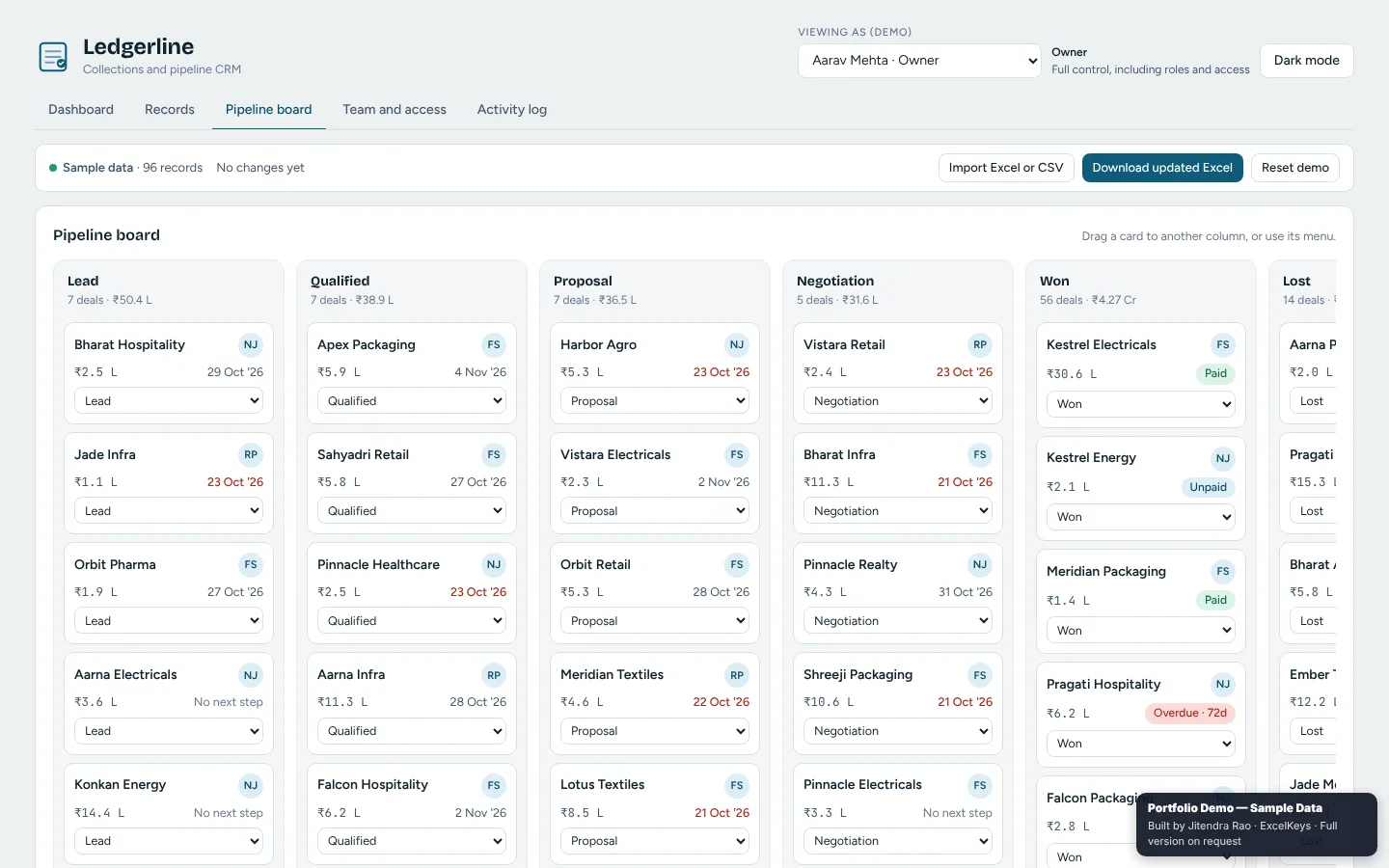
- A pipeline board from Lead to Won and Lost. Drag a card to another column or use its menu.
- Outstanding balance by days late, invoiced against collected for six months, and a record-payment action.
- A “to do today” panel with follow-ups due, invoices 31+ days late and deals with no next step.
- Roles that control who can see, edit or export, and an activity log of every change, who made it and when.
Private by design
Records are kept in your own browser and nothing is sent to a server. The public demo runs on fictional sample data. You can filter, click through every view and even load your own file, while export, print and save are switched off in the demo. The full working version is built for your team on request.
Ledgerline CRM: Sales and Collections Workspace at a glance
- Built for
- Small businesses, sales teams, accounts teams, agencies and freelancers
- Replaces
- Deals in one sheet, invoices in another and follow-ups from memory
- Input
- Your records from Excel or CSV
- Output
- Business pulse, pipeline board, receivables ageing, records, team access and an activity log
- Runs
- In the browser, records stay on your computer
Who it is for
- Small business owners who want sales and payments in one place
- Sales teams who move deals through stages every day
- Accounts teams who record payments and chase late invoices
- Agencies and freelancers who manage clients without a costly CRM
What it measures
| Metric | What it tells you |
|---|---|
| Business pulse | What happened, what is in progress, what is pending, what to do today and what is ahead |
| Pipeline by stage | Deals in Lead, Qualified, Proposal, Negotiation, Won and Lost |
| Outstanding by days late | Receivables ageing for unpaid invoices |
| Invoiced against collected | Six months of billing compared with cash received |
| To do today | Follow-ups due, invoices 31+ days late and deals with no next step |
| Activity log | Every edit and export, who made it and when |
How it works
- ImportLoad your records from Excel or CSV.
- Work the boardDrag deals between stages or use the card menu.
- CollectRecord payments and follow the who-to-chase list.
- ControlGive each person a role, from Owner to Viewer, and review the activity log.
Questions it answers
- What do we need to do today?
- Which deals are stuck without a next step?
- Who owes us money, and how late is it?
- How much did we invoice and how much did we collect?
- Who changed this record, and when?
Built around your team
The demo uses fictional sample data. For your team we rebuild it around your own file. Typical changes:
- Your own pipeline stages and record fields
- Roles and access rules that match your team
- Export of the updated workbook back to Excel
- Your company name, logo and colours
Who built it
Designed and built by Jitendra Rao, founder of Excel Keys, who has more than 11 years of hands-on experience in MIS reporting, sales analytics and dashboard automation. Every screenshot and demo uses fictional sample data.
Last updated
Frequently asked questions
What is Ledgerline CRM?
A lightweight CRM that keeps the sales pipeline and receivables in one workspace: a deal board, receivables ageing, payment recording, a to-do panel, role-based access and an activity log.
Which roles are available?
Six roles from Owner and Admin down to Sales Rep, Accounts and Viewer. Each role controls who can see, edit or export.
Where are the records stored?
In your own browser. Nothing is sent to a server, and the full version can export the updated workbook back to Excel.
What is switched off in the public demo?
Export, print and save are disabled in the public preview, and the data shown is fictional. Filters, charts and file upload all work, so you can test it with your own file. The full working version is built for your team on request.
Can it be built around our own file and KPIs?
Yes. What you see in the demo is a starting point. We rebuild it around your column names, your KPI definitions, your periods and your branding, and agree the exact scope in writing before work starts.
Does it work on a phone?
It is built for a laptop or desktop screen, where the tables and charts have room. Use Chrome, Edge or Firefox on a normal office computer.