

The time to hire formula is simple: the date the candidate accepted your offer minus the date they entered your pipeline. What trips people up is everything around it: which start date to use, whether to report the average or the median, and how to stop one slow hire from distorting the number. This guide shows the formula, the Excel functions behind it, and a free calculator you can fill with your own hires.
Key takeaways
- The time to hire formula is offer accepted date minus applied (or sourced) date, counted in days for each hire.
- Time to fill starts earlier, at requisition approval, so it is always equal to or longer than time to hire.
- Report the median beside the average. One very slow hire can push the average up while the median stays steady.
- Pick one start and end point, write it down and use it for every role. Consistency matters more than the definition you choose.
- AVERAGEIFS gives time to hire by role, source or recruiter without a PivotTable.
In this guide
- What is time to hire?
- The time to hire formula
- Time to hire vs time to fill
- How to calculate time to hire in Excel
- Reading the numbers
- Free time to hire calculator
- Common mistakes
- Frequently asked questions
What is time to hire?
Time to hire is the number of days between the moment a candidate enters your hiring pipeline, usually the application or sourcing date, and the day they accept your job offer. It measures how quickly your team moves a strong candidate from first contact to a yes.
Definitions vary between companies. Some start the clock at application, others at first recruiter contact, and some end it on the joining date. Workable explains the common variants, and all of them agree on one rule: choose one definition and apply it to every role. In India there is one extra wrinkle. A candidate who accepts today may join after a 30 to 90 day notice period, so I recommend ending time to hire at offer acceptance and tracking the notice period as its own metric.
When I review recruitment MIS, the first thing I check is whether every hire has both dates filled in. Missing dates quietly shrink the average and make the process look faster than it is.
The time to hire formula
Time to hire (days) = Offer accepted date − Applied date

Average time to hire = Sum of time to hire for all hires ÷ Number of hires
Take a hire who applied on 8 June 2026 and accepted the offer on 24 June 2026. The time to hire is 16 days. If you also want the time in working days, count only Monday to Friday, which gives 13 days for the same hire.
| Candidate | Role | Applied | Offer accepted | Time to hire (days) |
|---|---|---|---|---|
| C001 | Sales Executive | 08-Jun-2026 | 24-Jun-2026 | 16 |
| C002 | Sales Executive | 10-Jun-2026 | 18-Jun-2026 | 8 |
| C003 | Relationship Manager | 15-Jun-2026 | 17-Jul-2026 | 32 |
| C004 | MIS Analyst | 20-Jun-2026 | 14-Jul-2026 | 24 |
| C005 | Operations Executive | 22-Jun-2026 | 06-Jul-2026 | 14 |
For these five hires the average is (16 + 8 + 32 + 24 + 14) ÷ 5 = 18.8 days. That single number hides the fact that one hire took four times as long as another, which is why the next sections add the median and breakdowns.
Time to hire vs time to fill
Time to fill measures the whole job opening: it starts when the position is approved or advertised and ends when someone accepts. Time to hire measures the candidate journey and starts later, when the person you eventually hire enters the pipeline. The two terms are often used as if they mean the same thing, and they do not.
| Time to hire | Time to fill | |
|---|---|---|
| Clock starts | Candidate applies or is sourced | Requisition is approved (or job is posted) |
| Clock stops | Candidate accepts the offer | Candidate accepts the offer |
| Question it answers | How fast do we move a good candidate to a yes? | How long does a vacancy stay open? |
| Mostly useful to | Recruiters improving the process | Business heads planning headcount |
| Excel formula | Offer accepted − Applied | Offer accepted − Requisition approved |
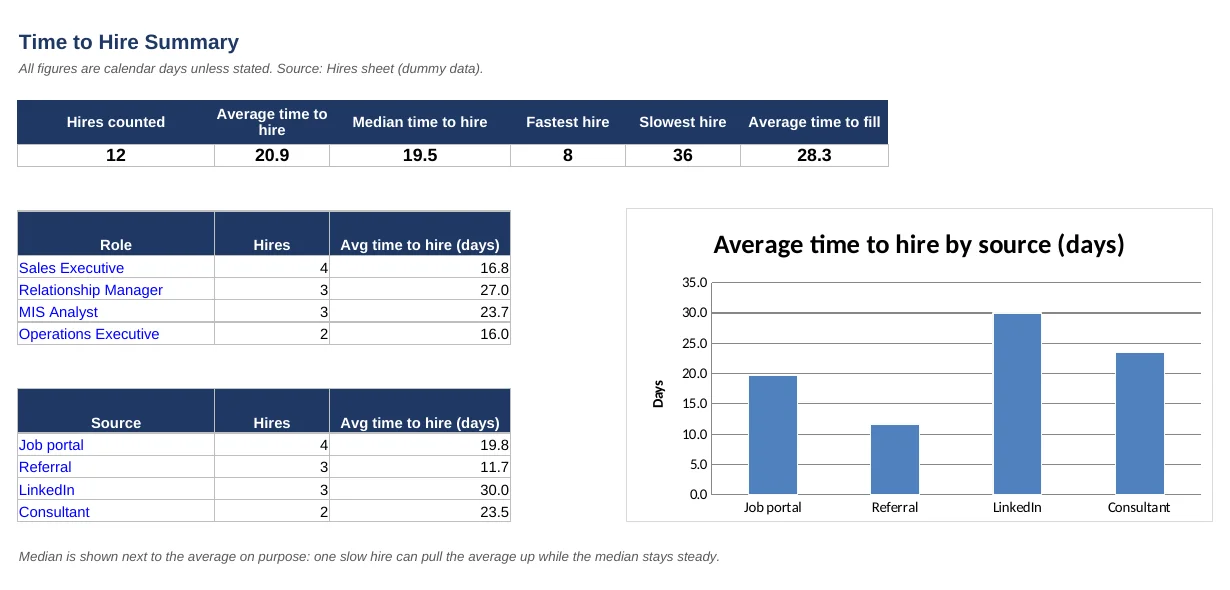
Because the time to fill clock starts earlier, it is always the same as or longer than time to hire for the same person. In the free calculator, average time to hire is 20.9 days while average time to fill is 28.3 days. The gap of about a week is the time between approving the vacancy and the eventual hire applying.
How to calculate time to hire in Excel
The steps below apply the time to hire formula in Excel using the free calculator, which has a Hires sheet and a Summary sheet. Every candidate is one row, and the dates are real Excel dates, not text.
Step 1: Set up one row per hire
Create columns for Candidate ID, Role, Source, Requisition approved, Applied and Offer accepted. Only include candidates who accepted an offer. If you need help with layout, the data preparation checklist covers the rules that keep formulas working.
Step 2: Calculate days for each hire
Time to hire:  =IF(OR(E2="",F2=""),"",F2-E2)
Time to fill:  =IF(OR(D2="",F2=""),"",F2-D2)
Column E is Applied, F is Offer accepted and D is Requisition approved. The IF wrapper returns a blank instead of a wrong number when a date is missing. Format the result column as a plain number, because Excel sometimes shows a date difference as a date.
Step 3: Average time to hire
=AVERAGE(Hires!$G$2:$G$200)AVERAGE ignores the blank cells returned by the IF formula, so you can extend the range to row 200 and add new hires without editing the formula.
Step 4: Median time to hire
=MEDIAN(Hires!$G$2:$G$200)The MEDIAN function returns the middle value. When one hire drags on for 90 days, the average jumps but the median barely moves, so showing both tells the real story.
Step 5: Time to hire by role or source
=AVERAGEIFS(Hires!$G$2:$G$200, Hires!$C$2:$C$200, $A16)AVERAGEIFS averages only the rows that meet a condition. Here column C holds the source and A16 holds the source name, such as Referral. Change the condition range to column B to get the same view by role. Wrap it in IF(COUNTIF(…)=0, “”, …) so an unused source does not show a #DIV/0! error.
Step 6: Working days instead of calendar days
=NETWORKDAYS(E2, F2)If your team reports in working days, NETWORKDAYS excludes Saturdays and Sundays. Pass a holiday list as a third argument if you want public holidays removed as well.
Reading the numbers
Here is what the summary of the twelve sample hires shows. These are dummy records, so treat them as a demonstration of the method, not as a benchmark.
| Measure | Result |
|---|---|
| Hires counted | 12 |
| Average time to hire | 20.9 days |
| Median time to hire | 19.5 days |
| Fastest / slowest hire | 8 days / 36 days |
| Average time to fill | 28.3 days |
Average and median are close here, so no single hire is distorting the picture. Now look at the breakdown by source. Referral hires average 11.7 days, while LinkedIn hires average 30.0 days, about 2.6 times longer. By role, Relationship Manager is the slowest at 27.0 days, against 16.8 days for Sales Executive.
This is what a time to hire report is for. It tells you where to dig: why do LinkedIn candidates take so long to reach an offer, and can the interview stages for the Relationship Manager role be shortened? With only twelve rows you would not act on it, but with a real year of hires the same two formulas will point at your biggest delays.
Free time to hire calculator (download)
The workbook used in this guide is free to download and adapt. It has a Hires sheet with twelve dummy records, a Summary sheet with the formulas, chart and breakdowns, and a How to use sheet with the assumptions.
- Blue cells are inputs; grey columns and the Summary sheet are formulas.
- Paste your own hires into the Hires sheet and copy the three formula columns down.
- Rename the roles and sources on the Summary sheet to match your data.
- Uses only classic functions (AVERAGE, MEDIAN, AVERAGEIFS, NETWORKDAYS), so it works in any modern Excel without macros.
Common mistakes when calculating time to hire
- Changing the start date between roles. If one role starts at requisition approval and another at application, the numbers cannot be compared.
- Mixing up time to hire and time to fill. Label every report with the definition you used.
- Including open or rejected candidates. Time to hire is measured only on people who accepted an offer.
- Reporting only the average. One outlier can hide a healthy process or make a good one look bad. Add the median.
- Ending the clock at the joining date. Notice periods are outside your control and will swamp the metric. Track offer-to-join separately.
- Dates stored as text. Subtraction returns an error or zero. Check that the date columns are right-aligned real dates.
What to do with the number
Time to hire becomes useful when it sits next to other recruitment measures such as stage-wise conversion and source quality. Our guide to talent acquisition dashboard KPIs shows which ones to track together. If you want these formulas turned into an automatic recruitment dashboard that refreshes from your tracker, see our HR analytics dashboard work or send us a message with a sample of your file (dummy values are fine).
Frequently asked questions
What is the formula for time to hire?
Time to hire equals the offer accepted date minus the date the candidate applied or was sourced, counted in days. To get the average, add up the days for all hires in a period and divide by the number of hires.
How do I calculate time to hire in Excel?
Subtract the application date from the offer accepted date in a new column, for example =F2-E2. Then use AVERAGE for the mean, MEDIAN for the middle value and AVERAGEIFS to break it down by role, source or recruiter.
What is the difference between time to hire and time to fill?
Time to fill starts when the job is approved or posted. Time to hire starts when the eventual hire enters your pipeline. Both end at offer acceptance, so time to fill is always equal to or longer than time to hire.
What is a good time to hire?
There is no single good number. It depends on the role, seniority and market. Compare roles of a similar type inside your own company, watch whether the median is falling month by month, and use outside benchmarks only as a rough guide.
Should I use calendar days or working days?
Calendar days are the default and match how candidates experience waiting. Working days suit teams that report against a service level. Whichever you choose, use the same one every month, and say which one the report uses.
Does time to hire include the notice period?
No. Time to hire ends when the candidate accepts the offer. The notice period before joining is a separate measure, often called offer-to-join time, and it depends mostly on the candidate’s current employer.
Measure your time to hire once, then track it monthly
The time to hire formula is just one subtraction, but the value comes from consistent definitions, a median beside the average and a breakdown by role and source. Download the calculator, replace the dummy rows with your own hires and you will have a working report in under an hour.
About the author: Jitendra Rao is the founder of Excel Keys and has spent over 11 years building MIS reports, sales analytics and dashboard automation for banking and finance teams. He builds Excel dashboards that run offline, on your own files. Last updated: 16 October 2026.